Part VI · Monitor and beyond
Control your hydroponic garden from your smartphone: Matter, Home Assistant, Apple TV 4K or Android
Check the pH from your desk, turn on the grow light from the couch, get an alert on the TV when the reservoir is empty: the complete guide to the connected garden. The architecture, the standards (Matter, Thread, Zigbee, Wi-Fi, IP, CE), Apple TV 4K or Android, the hardware list by budget, where to find it, and step-by-step setup.
Check the solution temperature from your desk, turn the grow light back on from the couch, see “Reservoir almost empty” pop up on the TV during a movie: a hydroponic garden is easy to control from a smartphone. You still need to pick the right sensors, the right radio standard and the right ecosystem, Apple or Android. Here are the architecture, the usable standards, the hardware list by budget, where to find it and step-by-step setup.
This guide complements automating your garden, which covers building an ESP32 monitoring station, calibrating the probes and the safeguards. Here, the topic is connecting everything to your phone and your TV.
1. What you can do from your phone
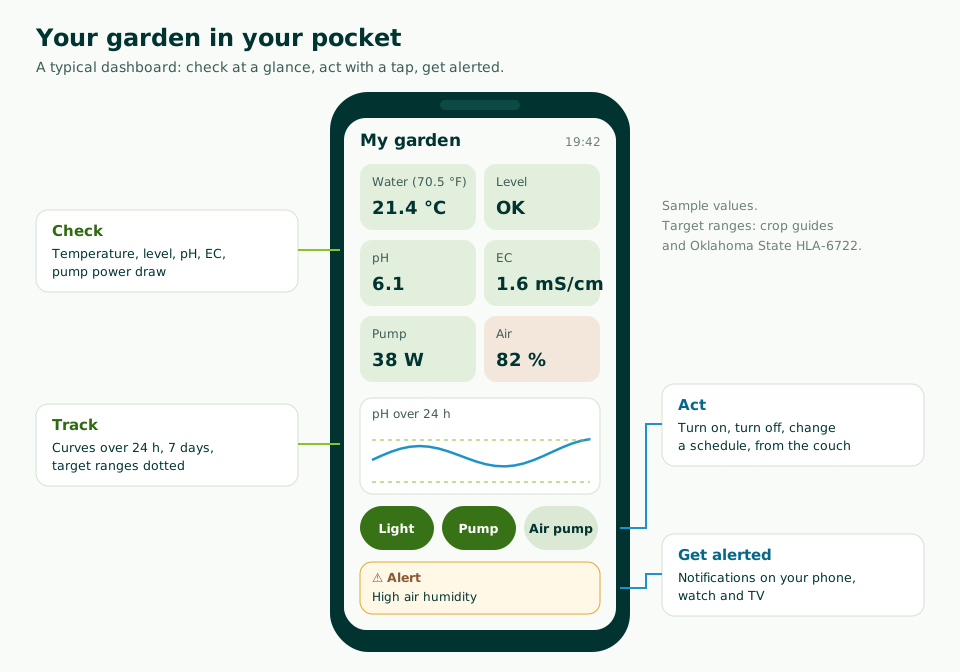
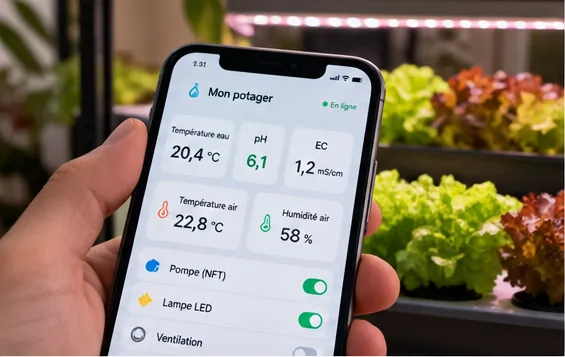
- Check: water temperature, reservoir level, pH, EC, pump power draw, air and light, in real time.
- Track: curves over 24 hours, 7 days or a season, with the target ranges (see pH and EC).
- Act: turn the light, pump and air pump on or off, change a schedule, start a water top-up.
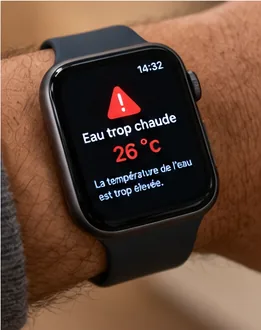
- Get alerted: a notification on your phone, watch or TV when a reading leaves its range or the pump stops.
2. The architecture: one brain, several screens
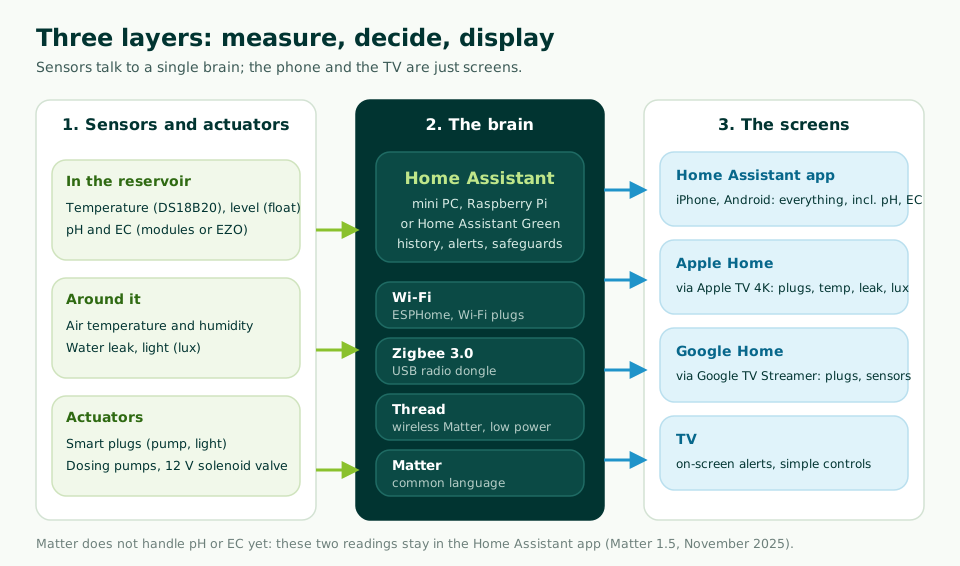
The classic mistake: piling up apps, one per brand of plug or sensor. Better to have a single brain that receives every reading, keeps the history, applies the safeguards, and shares what is needed with the screens in the house.
- Layer 1, sensors and actuators: in the reservoir, around the system, and the ones that act (smart plugs, dosing pumps, solenoid valve).
- Layer 2, the brain: Home Assistant, free open-source home automation software that runs at home on a mini PC, a Raspberry Pi or the Home Assistant Green box. It is the only one that reads pH and EC probes.
- Layer 3, the screens: the Home Assistant app (iPhone, iPad, Android), Apple’s Home app, Google Home, and the TV for alerts.


For a small garden without connected pH or EC, you can skip Home Assistant: Matter plugs and sensors, an Apple or Google hub, and that’s it. As soon as you want to monitor the solution itself, Home Assistant becomes essential.
3. The usable standards
Two families of standards matter: those that make devices talk, and those that make them safe near water.
| Standard | What it is | For the garden | Good to know |
|---|---|---|---|
| Matter | Common language of Apple, Google, Amazon and Samsung, backed by the Connectivity Standards Alliance | Smart plugs (with energy monitoring since version 1.3), temperature, humidity, light, leaks, flow, pressure, valves, pumps; soil sensors since 1.5 (November 2025) | No pH or EC. A Matter device can be added to several apps at once |
| Thread | Low-power mesh radio network that Matter can run on | Battery sensors: leak, temperature, humidity | You need a “border router”: compatible Apple TV 4K, HomePod mini, Google TV Streamer, Nest Hub (2nd gen)… |
| Wi-Fi | Your home router’s network | Smart plugs, ESP32 boards with probes, ready-made pH/EC monitors | Simple, but power-hungry: only for mains-powered devices |
| Zigbee 3.0 | Very widespread low-power mesh network | Cheap battery sensors (leak, temperature, humidity), smart plugs | Needs a gateway or a USB dongle plugged into Home Assistant |
| Z-Wave | Mesh network on a dedicated band (868 MHz in Europe) | Smart plugs, sensors | Reliable but more expensive; not very useful if you are starting from scratch |
| Bluetooth | Short-range link | Some pocket pH/EC testers | Range of a few meters: one-off readings, no remote monitoring without a relay |
| ESPHome, MQTT | Open protocols from the DIY world | ESP32 monitoring station: pH, EC, temperature, level | ESPHome connects to Home Assistant in a few clicks |
| Safety standard | What it guarantees | For the garden |
|---|---|---|
| CE marking (Directive 2014/53/EU for radio devices) | The device meets European electrical and radio safety requirements | Mandatory for anything that plugs into 230 V: smart plugs, power supplies, pumps |
| IP code (EN 60529 standard) | Protection against dust (1st digit) and water (2nd digit) | IPX4: splashes from all directions; IPX5: water jets; IPX7: temporary immersion. Outdoors or above a reservoir, aim for at least IPX4, IP65 for an enclosure |
| 30 mA residual current device | Cuts the power if current leaks to ground | The circuit that powers the garden must be protected by one; if in doubt, have an electrician check it |
| Extra-low voltage (5 or 12 V) | No risk of electrocution | Everything you build yourself: boards, probes, small pumps, solenoid valves |
4. Apple TV 4K or Android: which ecosystem?
The phone displays, but it is a hub that stays at home which runs the automations and relays commands when you are out.
| Apple side (iPhone) | Android side | |
|---|---|---|
| Hub | Apple TV 4K or HomePod: required to add Matter accessories and to control remotely (Apple) | Google TV Streamer (4K), Nest Hub (2nd gen), Nest Hub Max, Nest Wifi Pro, Google Home speaker (Google) |
| Thread | 3rd generation Apple TV 4K Wi-Fi + Ethernet, HomePod mini | The five devices above; Nest Mini, Nest Audio and the first Nest Hub: Matter over Wi-Fi only |
| App | Home (iPhone, iPad, Mac, watch) | Google Home |
| Shows pH and EC? | No: Home Assistant app for iPhone | No: Home Assistant app for Android |
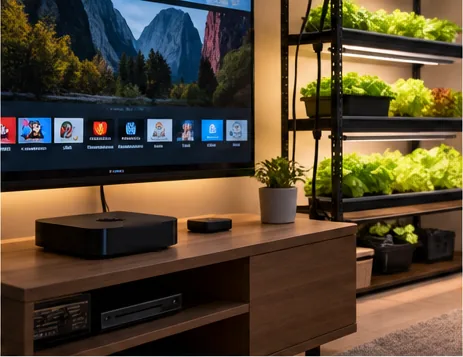
| Alerts on the TV | On the iPhone, iPad, watch | On Android TV, Google TV, Fire TV (Home Assistant integration) |
Good news: you don’t have to choose once and for all. A Matter device can be shared between Apple Home, Google Home and Home Assistant at the same time. And Home Assistant, for its part, can present its sensors to the Home app through its “HomeKit Bridge” module: temperature, humidity, light, leaks, switches and valves go through; pH and EC do not.
5. The sensors you need
| Reading | Why | Sensor | Standard | Priority |
|---|---|---|---|---|
| Water temperature | Oxygen and Pythium (see oxygen and temperature) | DS18B20 waterproof probe on an ESP32, or lab-grade PT-1000 probe | Wi-Fi (ESPHome) | Essential |
| Reservoir level | Empty reservoir = dry roots, pump running dry | Float switch (contact), waterproof ultrasonic sensor | Wi-Fi (ESPHome) | Essential |
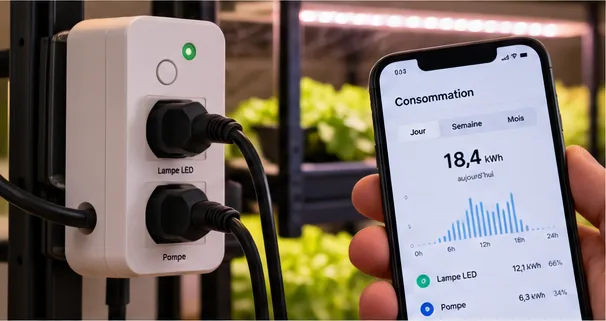
| Pump power draw | 0 W = pump stopped | Smart plug with energy monitoring | Matter, Zigbee, Wi-Fi | Essential |
| EC | Concentration of the solution | Analog module and probe (K = 1), or EZO-EC circuit | Wi-Fi (ESPHome) | Recommended |
| pH | Nutrient availability | Analog module and probe, or EZO-pH circuit | Wi-Fi (ESPHome) | Recommended, monthly calibration |
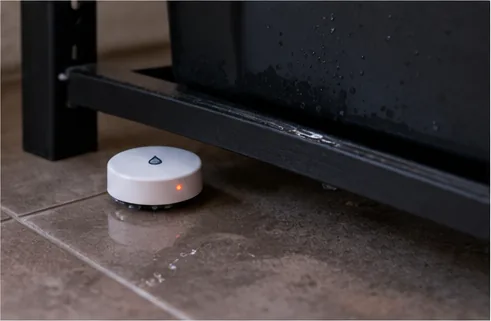
| Water leak | Disconnected hose, cracked reservoir | Leak detector on the floor | Matter/Thread, Zigbee | Recommended indoors |
| Air: temperature, humidity | Grow tent, sunroom, closed room | Battery-powered climate sensor | Matter/Thread, Zigbee | Useful |
| Light | Know whether the lamp needs to supplement (see natural light or LED) | Light sensor (lux) | Matter, Zigbee | Useful |
| Flow | NFT, towers: is the water circulating? | Turbine flow meter on the hose | Wi-Fi (ESPHome) | Optional |

Target ranges for pH and EC: Oklahoma State University (HLA-6722) and our crop guides. The nutrient calculator lists them crop by crop.
| What acts | Hardware | Standard |
|---|---|---|
| Light, pump, air pump | CE-marked smart plugs with energy monitoring | Matter (Wi-Fi or Thread), Zigbee |
| Water top-up | Solenoid valve or small 12 V pump, driven by the ESP32; or a smart valve | Wi-Fi (ESPHome), Matter (valve) |
| pH and nutrient dosing | 12 V peristaltic dosing pumps | Wi-Fi (ESPHome) |
6. The hardware list, by budget
| Package | Hardware | What you see on your phone |
|---|---|---|
| 1. The essentials, no computer | 2 Matter smart plugs with energy monitoring (light, pump); a Matter leak sensor and climate sensor; the hub you already have (Apple TV 4K, HomePod, Google TV Streamer, Nest Hub) | On, off, schedules; pump power draw; leak, air; everything in the Home app or Google Home |
| 2. The full setup, with Home Assistant | Package 1 + a Home Assistant Green box or a mini PC; a Zigbee/Thread dongle (Home Assistant Connect ZBT-2, $49 at launch in November 2025); an ESP32 station with temperature probe, float, pH and EC modules (see the tutorial) | Everything, pH and EC included, curves, alerts, safeguards; common sensors also in Apple Home or Google Home |
| 3. The precise one, lab grade | Package 2, with Atlas Scientific EZO circuits (pH, EC, PT-1000 temperature) instead of the analog modules; or a ready-made pH/EC monitor with Wi-Fi | More stable, better compensated readings; same dashboard |
We don’t give total prices: they vary a lot with brands and sales. Published reference points: ZBT-2 dongle, $49 (Home Assistant, November 2025); Atlas Scientific Wi-Fi Hydroponics kit (pH, EC, temperature), from $644.99 on the manufacturer’s website.
7. Where to find the hardware
| Hardware | Examples | Where to find it |
|---|---|---|
| Matter plugs and sensors | Plugs with energy monitoring (TP-Link Tapo P110M, Eve Energy); IKEA 2025-2026 range: GRILLPLATS plug, TIMMERFLOTTE climate sensor, KLIPPBOK leak detector | Appliance and electronics stores, home improvement stores, IKEA, online shops. Look for the Matter logo on the box |
| Zigbee sensors | Leak detectors, climate sensors from major brands | Same stores; check for “Zigbee 3.0” |
| Home Assistant Green, ZBT-2 dongle | Official Home Assistant hardware | Official resellers listed on home-assistant.io, including European resellers |
| ESP32 boards, DS18B20 probes, floats, pH and EC modules | DFRobot Gravity range (pH, EC, temperature) | Maker electronics stores, online; the manufacturer’s website lists its distributors |
| Lab-grade circuits | Atlas Scientific EZO-pH, EZO-EC, EZO-RTD, ESPHome compatible | Manufacturer’s website and distributors |
| Ready-made pH/EC monitors | Bluelab Guardian Monitor Wi-Fi (Edenic app) | Grow shops, in store or online |
| Dosing pumps, 12 V solenoid valves | Peristaltic pumps, brass or plastic solenoid valves | Electronics stores, aquarium stores, grow shops |
8. Setup, step by step
- The hub. On iPhone, enable the Apple TV 4K or HomePod as the home hub in the Home app. On Android, set up the Google TV Streamer or Nest Hub in Google Home.
- The Matter plugs. Plug them in, scan the Matter code with the Home app or Google Home. Set a backup schedule in the plug itself: the light and pump keep running even if everything else fails.
- Home Assistant. Install it on a Home Assistant Green or a mini PC, plug in the ZBT-2 dongle, add the Zigbee or Thread sensors.
- The monitoring station. Build the ESP32 with its probes and connect it to Home Assistant through ESPHome: it is all explained in automating your garden. Calibrate pH and EC before trusting the curves.
- Sharing. Add the Matter plugs to Home Assistant too (they stay in the Home app or Google Home). Enable HomeKit Bridge to show the common sensors in the Home app.
- The phone. Install the Home Assistant app and build the dashboard: tiles, curves, buttons. Turn on notifications.
- Alerts. Water temperature too high, low level, pump at 0 W, pH or EC out of range: one alert per problem, with a delay to avoid false alarms. Add the TV if you have an Android TV.
- Remote access. Through the Apple or Google hub for their apps; for Home Assistant, a Home Assistant Cloud subscription or a VPN. Never expose it directly to the Internet.

9. Security and privacy
- Local first: Matter, Zigbee, Thread and ESPHome work without Internet. The garden keeps running if the router goes down.
- Safeguards for everything that acts: maximum top-up time, number of doses per day, an alert if the reading does not come back. See level 3 of automation.
- Protected accounts: a unique password, two-factor authentication on Home Assistant and on your Apple or Google accounts.
- Regular updates of the hub, Home Assistant and the smart plugs.
- Electricity: electronics above the water, IP65 enclosure, cables with drip loops, a drip tray, a circuit protected by a 30 mA residual current device.
10. Common mistakes
| Mistake | Consequence | The fix |
|---|---|---|
| One app per brand | Five apps, no overall view | One brain (Home Assistant) or a single Matter ecosystem |
| Looking for pH in the Home app | Not there | Home Assistant app for pH and EC |
| Thread sensors without a border router | They won’t connect | Apple TV 4K Wi-Fi + Ethernet, HomePod mini, Google TV Streamer, Nest Hub (2nd gen) |
| Everything depends on a manufacturer’s cloud | Nothing works if the service or the Internet goes down | Local hardware: Matter, Zigbee, ESPHome |
| No-name plug on the pump | Electrical risk near water | CE marking, identifiable brand, 30 mA residual current device |
| Automatic dosing from day one | A drifting probe empties the acid bottle | Weeks of alerts first, then safeguards |
| Home Assistant exposed to the Internet | A way in for hackers | Home Assistant Cloud or VPN |
11. Key takeaways
Have you connected your garden? Show off your dashboard on the forum.
Frequently asked questions
Can I see pH and EC in Apple’s Home app or in Google Home?
Not today. Matter, the common standard of Apple and Google, has no pH or conductivity sensor type (Matter 1.5, November 2025). Home Assistant reads these probes and shows them in its app for iPhone and Android; Apple Home and Google Home get the rest: temperature, humidity, light, leaks, smart plugs.
What is the Apple TV 4K for in a connected garden?
It acts as the home hub: without it (or a HomePod), Apple says you can neither add Matter accessories to the Home app nor control your home remotely. The 3rd generation Apple TV 4K Wi-Fi + Ethernet model is also a Thread router, which low-power wireless Matter accessories need.
What about an Android phone?
The Google Home app adds Matter devices. To control them remotely and use Thread, you need a Thread-capable Google hub: Google TV Streamer (4K), Nest Hub (2nd gen), Nest Hub Max, Nest Wifi Pro or the new Google Home speaker. The Home Assistant app is also available on Android, with pH and EC.
Which sensors should I buy first?
A water temperature probe, a level float and a smart plug that measures the pump’s power draw: they catch the three serious failures (solution too warm, empty reservoir, stopped pump) without calibration. Then add EC, then pH, which need regular calibration.
Do I need a subscription to control the garden remotely?
No, it is not required. With the Apple or Google ecosystem, the hub (Apple TV, Google TV Streamer) provides remote access. With Home Assistant, you can take the Home Assistant Cloud subscription, which funds the project, or set up your own secure VPN access. Never expose Home Assistant directly to the Internet without protection.
Can I get garden alerts on the TV?
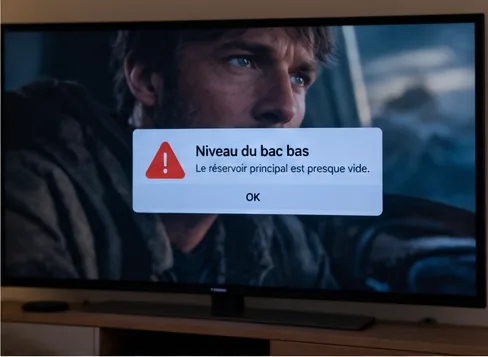
Yes. With an Android TV, a Google TV or a Fire TV, Home Assistant’s official “Notifications for Android TV / Fire TV” integration shows a message on top of whatever is playing, image included. On Apple TV, the alert arrives on the iPhone, iPad or watch.
- Connectivity Standards Alliance, Matter 1.5 (November 20, 2025) and Matter Handbook, certifiable device types
- Apple, Set up HomePod or Apple TV as a home hub
- Google, Google Home Help, get your home ready for Matter
- Home Assistant, HomeKit Bridge documentation, Notifications for Android TV / Fire TV, Home Assistant Connect ZBT-2
- ESPHome, EZO component (Atlas Scientific)
- Atlas Scientific, Wi-Fi Hydroponics Kit
- Bluelab, Guardian Monitor Wi-Fi
- IKEA, new Matter-compatible smart home range (November 6, 2025)
- EN 60529 standard (IP codes)
- Directive 2014/53/EU (radio equipment)
- Oklahoma State University Extension, HLA-6722